 Entry
Entry Dashboard
 Contacts
 Properties
 Email
Email Calendar
 Tasks
Tasks Acquisition Cockpit
 Audit-proof mail archiving
 Automatic brochure dispatch
 Billing
 Groups
 Intranet
 Marketing Box
 Marketplace
 Multi Property module
 Multilingual Module
 onOffice sync
 Presentation PDFs
 Process manager
 Project Management
 Property tracking
 Property value analyses
 Enquiry Manager
 Showcase TV
 Smart site 2.0
 Statistic Tab
 Statistics toolbox
 Success Cockpit
 Time Tracking
 Address from clipboard
 Text block
 Customer communication
 External Tools
 Favorite links
 Calculating with formulas
 Mass update
 onOffice-MLS
 Portals
 Property import
 Quick Access
 Settings
 Templates
 Step by step


You are here: Home / Extras / Settings / User / User details / Portal settings per user

Settings
Portal settings per user
Set Up Portal, Change
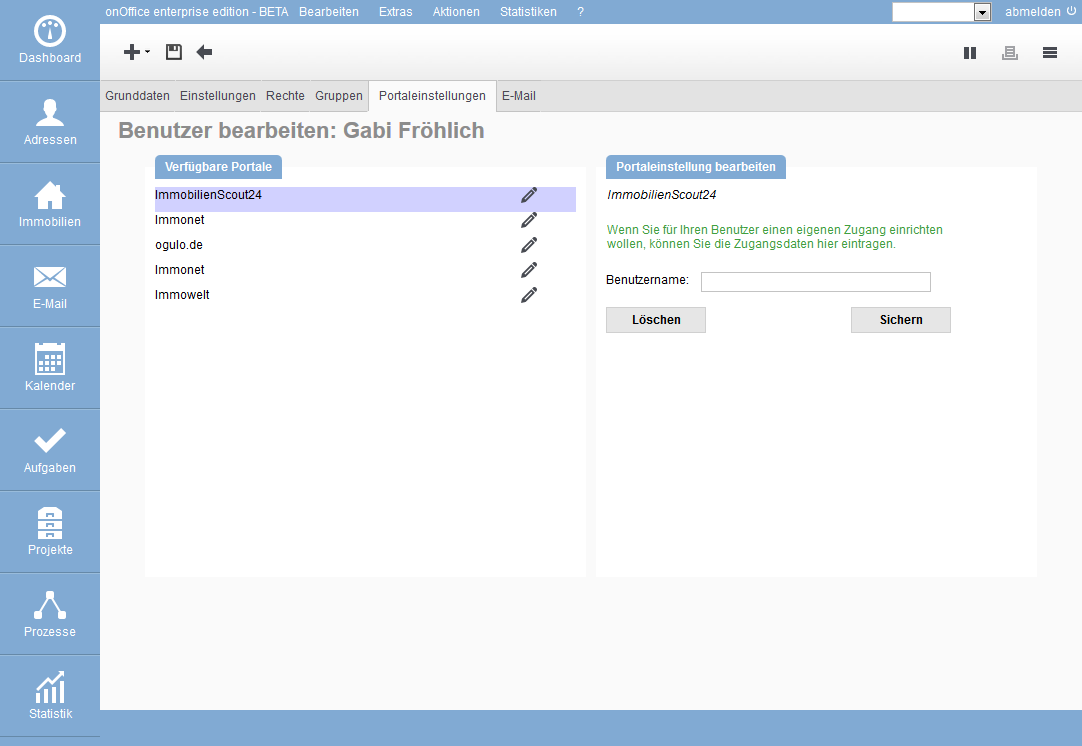
The tab on the left displays all portals that you have assigned access data to and activated in the portal settings. Click on the edit icon  to open the portal settings on the right side.
The system displays whether general access data already exists. Below you can enter your individual access data. The existing fields correspond to those in the general portal settings. Configurations such as property boundary or property rotation cannot be set here.
You can change existing access data here afterwards.
Please do not forget to save your entries.
Delete portal
Portals cannot be deleted here, only the use of user-specific connection data can be stopped. To do this, please click on the “Delete” button in the portal settings. All field entries are cleared and you can now save the change