 Entry
Entry Dashboard
 Contacts
 Properties
 Email
Email Calendar
 Tasks
Tasks Acquisition Cockpit
 Audit-proof mail archiving
 Automatic brochure dispatch
 Billing
 Groups
 Intranet
 Marketing Box
 Marketplace
 Multi Property module
 Multilingual Module
 onOffice sync
 Presentation PDFs
 Process manager
 Project Management
 Property tracking
 Property value analyses
 Enquiry Manager
 Showcase TV
 Smart site 2.0
 Statistic Tab
 Statistics toolbox
 Success Cockpit
 Time Tracking
 Address from clipboard
 Text block
 Customer communication
 External Tools
 Favorite links
 Calculating with formulas
 Mass update
 onOffice-MLS
 Portals
 Property import
 Quick Access
 Settings
 Templates
 Step by step


You are here: Home / Additional modules / Statistics toolkit / Use statistics / Work with statistics / Number of properties being marketed / Time reference

Statistics toolkit
Number of properties being marketed / Time reference

Template “Number of properties on the market”
The statistics contain 3 criteria (houses, apartments, commercial) for which the key figures are displayed in the selected period. This involves filtering according to the respective property type and checking which of these was published on a portal in the month in question.
The key figure is the number of properties that were visible in a portal in the month in question. In other words, all those that were posted in the month, are still posted from the previous month and were removed from the portals in this or a subsequent month.
Settings for “Temporal reference” in the example
The temporal reference is the special and difficult aspect of this statistic – and is the point that should be clarified when compiling your own statistics. Especially as this does not simply count the properties that have been in a portal at some point, but a specific period of time can be set. In this example, the specified month is used as the time reference value. However, you can also display the quarter or the previous month. The difficult part is specifying the required fields and their timing.
The corresponding settings are already stored in the standard template, which we will now take a closer look at.
To do this, we need to open the statistics settings via the wrench icon  in the widget frame.
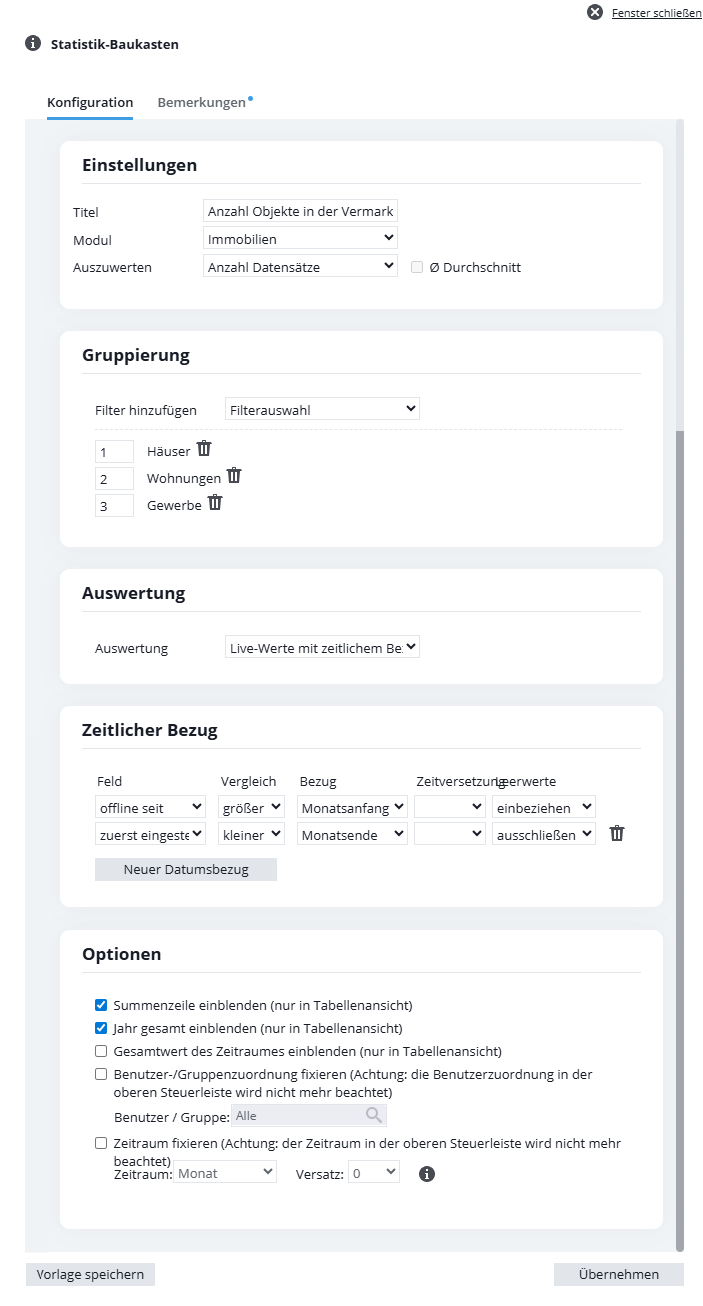
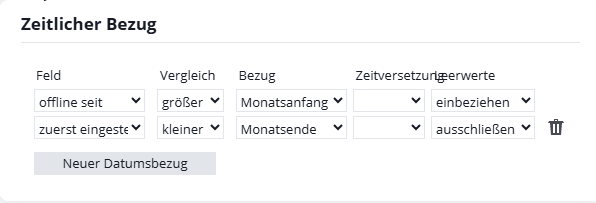
The other default is the “offline since” field (the field can be found in the property data record on the “Details” tab and there in the “Administration” category).
In the example, “first set” > “lower end of month” is specified. This covers all properties that were listed in the month under review or before. However, this still includes properties that are no longer published on the portal.
The second part is required for this, namely “offline since” > “greater than beginning of month”. This results in all properties that went offline in the month in question or thereafter – i.e. were removed from all portals.
Whether and how non-existent dates (“offline since” is not yet filled for newly transferred properties) are counted must be specified under “Blank values”. In the example, these are excluded for “first hired” so that only properties that were hired at all are included. Empty fields are included for “offline since”. This field is still empty for a property that has just been added to a portal. These properties must be counted, therefore include “empty values”.
The result is the properties that are online this month.
With “Temporal reference” and the information that the date is less than or greater than “Start of month/end of month”, you can create a kind of “bracket” for the month in question.
Further settings for “Time reference”
Another field can be added to the evaluation using the “New date reference” button. The trash can symbol  can be used to delete references that are no longer required.
In addition to “Start of month/end of month”, you can also select another reference, namely “in month”. The date of the selected field must then be in the month, the “comparison” is omitted. “Time offset” and “Blank values” can also be specified here.