 Dashboard
 Contacts
 Properties
 Email
Email Calendar
 Tasks
Tasks Address from clipboard
 Text block
 Customer communication
 External Tools
 Favorite links
 Calculating with formulas
 Mass update
 onOffice-MLS
 Portals
 Property import
 Quick Access
 Settings
 Templates
 Step by step


You are here: Home / Modules / Email / Assign emails / Assigning Properties Manually

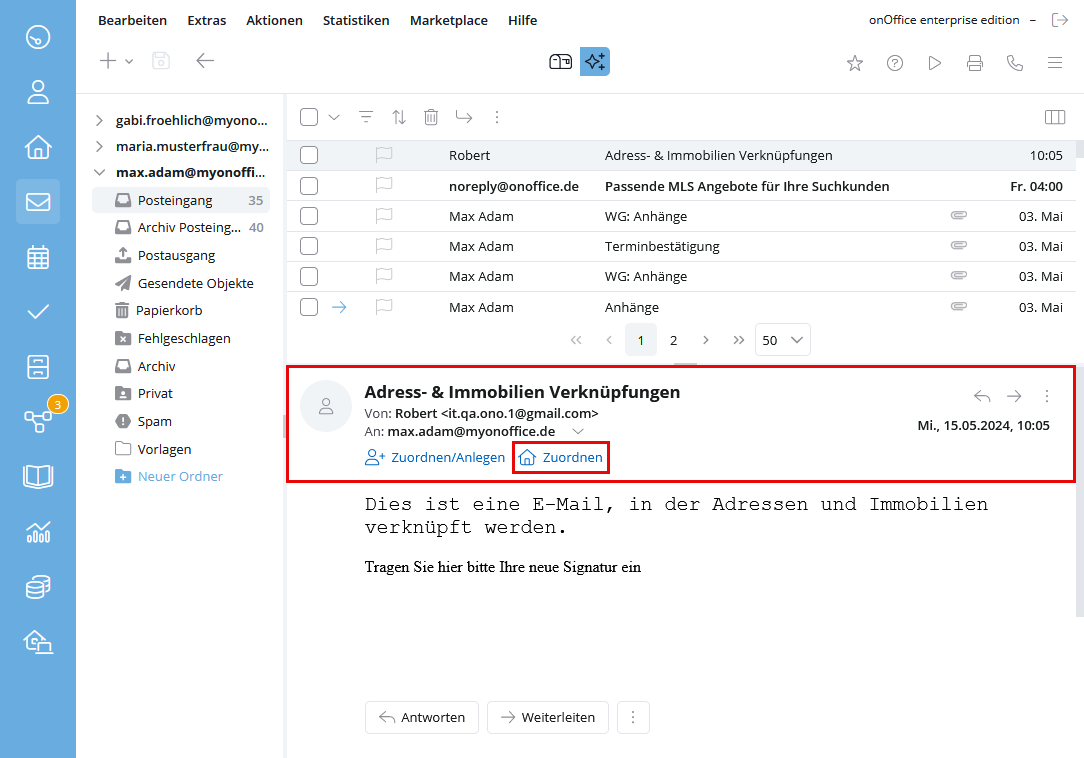
Assigning Properties Manually




Email

 Acquisition Cockpit
 API Module
 Audit-proof mail archiving
 Automatic brochure dispatchAutomatic CSV export
 Billing
 Groups
 Intranet
 Marketing Box
 Marketplace
 Multi Property module
 Multilingual ModuleOnline feedback
 onOffice sync
 Presentation PDFs
 Process manager
 Project Management
 Property tracking
 Property value analyses
 Enquiry Manager
 Showcase TV
 Smart site 2.0
 Statistic Tab
 Statistics toolbox
 Success CockpitTelephone module
 Time TrackingWhatsapp Web
 English
You are here: Home / Modules / Email / Assign emails / Assigning Properties Manually