
 Entry
Entry Dashboard
 Contacts
 Properties
 Email
Email Calendar
 Tasks
Tasks Acquisition Cockpit
 Audit-proof mail archiving
 Automatic brochure dispatch
 Billing
 Groups
 Intranet
 Marketing Box
 Marketplace
 Multi Property module
 Multilingual Module
 onOffice sync
 Presentation PDFs
 Process manager
 Project Management
 Property tracking
 Property value analyses
 Enquiry Manager
 Showcase TV
 Smart site 2.0
 Statistic Tab
 Statistics toolbox
 Success Cockpit
 Time Tracking
 Address from clipboard
 Text block
 Customer communication
 External Tools
 Favorite links
 Calculating with formulas
 Mass update
 onOffice-MLS
 Portals
 Property import
 Quick Access
 Settings
 Templates
 Step by step


You are here: Home / Additional modules / Marketplace / Provider overview / ImmoImport (ITA) - Immobiliare-Import

Marketplace
ImmoImport (ITA) – Immobiliare-Import
Description
With the onOffice ImmoImport service, you can transfer property data directly from the Italian portal Immobiliare.it to onOffice enterprise. This saves you having to type in the data manually and enables existing advertisements to be transferred efficiently.
Access to the service
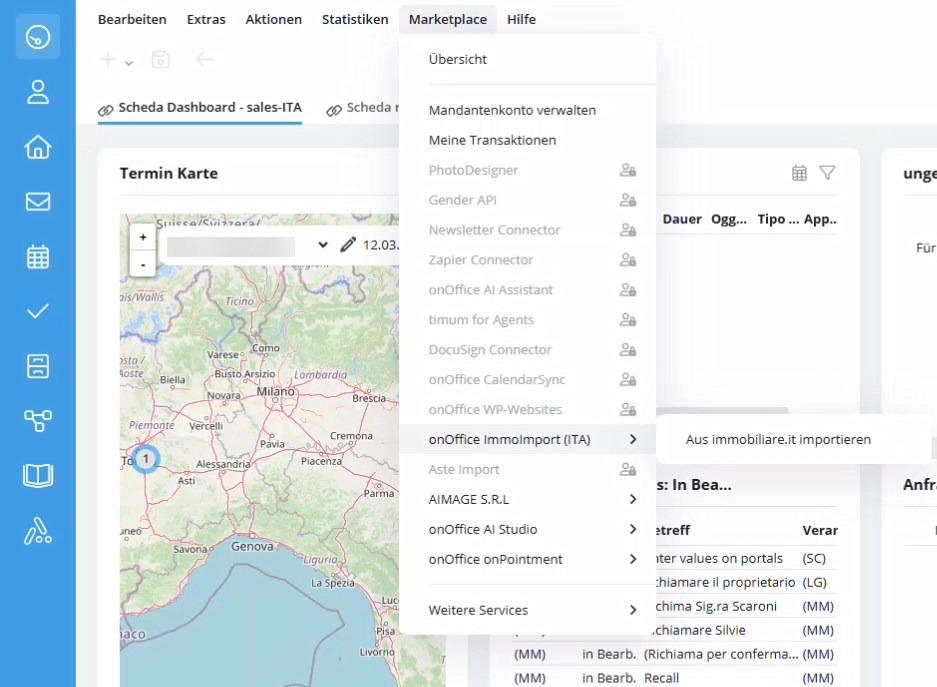
Call up Marketplace >> onOffice ImmoImport (ITA) >> From immobiliare.it in the Market menu.
Importing properties
-
Copy URL: Open the desired advertisement on immobiliare.it and copy the complete URL from the address bar of your browser.
-
Insert link: Paste the link into the input field at “Incolla qui”.
-
Start import: Click on the Avvia importazione (Start import) button.
-
After successful completion, you will find the imported property in your property list. Fields such as category, marketing type, address, prices and areas are filled in automatically if they were available in the source advertisement.

Status and history
At the bottom of the window you will find the item Storico importazioni (Import history). Here you can view the progress of your current and past imports:
-
In progress: A rotating symbol indicates that the import is currently running. Elaborazione in corso” is displayed under Status.
-
Successful: A green tick (positive) confirms the successful import.
-
Failed: A red warning symbol (Negativo) indicates problems. You can use the Vedi errori (Show errors) button to call up details on the reason for the failure (e.g. errors when uploading images).